Within Erplain, your On-Hand inventory is updated every time you create any of the following transactions:
- Shipping Orders (from Sales Orders)
- Invoices
- Product returns
- Stock entries
- Stock removals
- Purchase Deliveries (from Purchase Orders)
Erplain will sync your On-Hand inventory with QuickBooks for all these transactions except for Shipping Orders. Shipping Orders are created from Sales Orders, and are not supported by QuickBooks Online. From the time you create the Shipping Order in Erplain to when you create the Invoice from the Sales Order or Shipping order, you will notice a temporary difference between Erplain and QuickBooks.
You can also block inventory adjustments coming from QuickBooks to Erplain.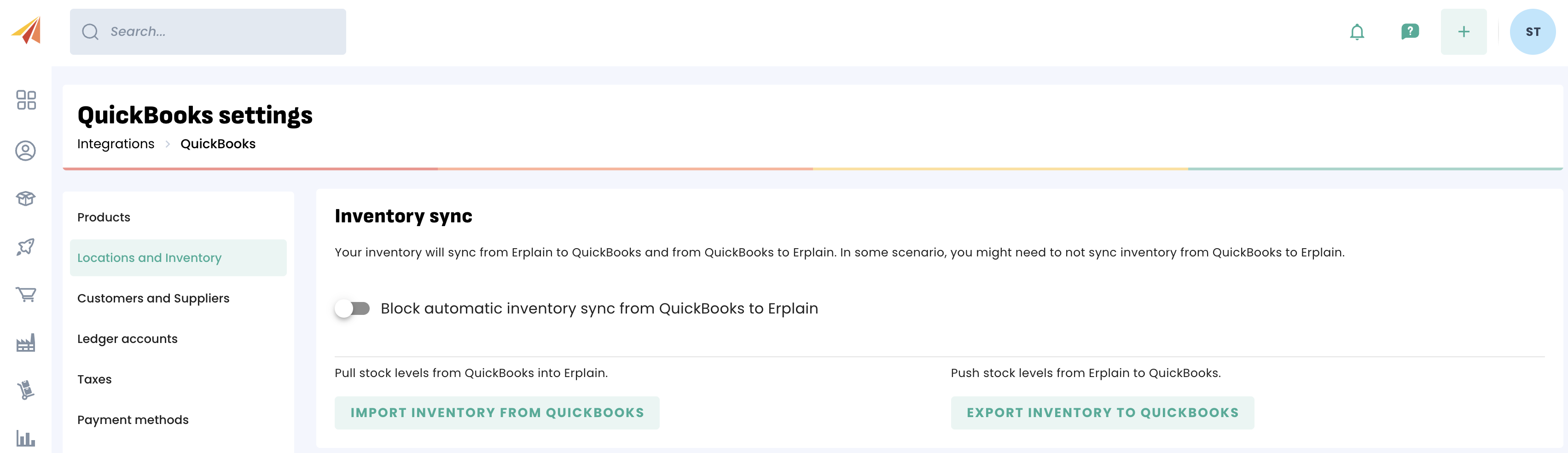
If that option is turned ON, no inventory adjustment made in QuickBooks will appear in Erplain.
If that option is turned OFF, inventory updates from QuickBooks will adjust your stock levels in Erplain.
QuickBooks Stock
In each product page, you can see a QuickBooks Online section. That section will show you if there are any discrepancies and if so, the documents causing them.
Inventory adjustments
QuickBooks doesn't allow 3rd party apps to create Stock adjustments so Erplain can only send the new quantity of the product. QuickBooks then creates the corresponding stock adjustment but we have no control on the ledger accounts or dates used by QuickBooks.
QuickBooks typically uses the inventory shrinkage account when it creates these stock adjustments.
When you create a manufacturing order in Erplain, it is exactly like decreasing the inventory of the components and increasing the inventory of the assembly. Then Erplain sends the new quantity to QuickBooks (not a stock adjustment).
Of course, you can update the ledger account in the inventory adjustment in QuickBooks once it is created although that adds an extra step.
You will find more information about the Sales workflow and the Inventory update in this article.
Was this article helpful?
That’s Great!
Thank you for your feedback
Sorry! We couldn't be helpful
Thank you for your feedback
Feedback sent
We appreciate your effort and will try to fix the article