
This article explains how the integration works between Erplain and Shopify. You can find more details and instructions for each section on this page.
Selecting the sync mode
Erplain now offers two different sync modes with Shopify.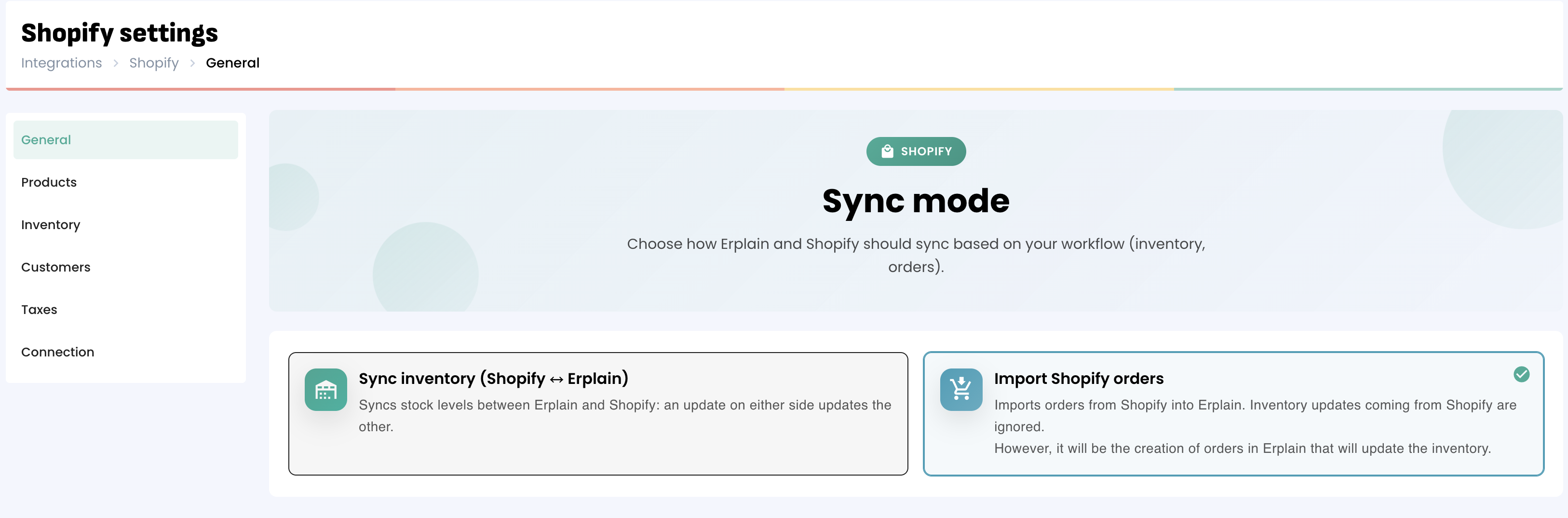
The first once only syncs the inventory, the orders are not imported from Shopify and the inventory is updated both ways.
The second mode imports Shopify orders as they are created, inventory updates from Shopify are not synced with Erplain, it is the creation of those documents in Erplain that updated the inventory in Shopify.
Initial validation
A first validation is necessary before going further with the Shopify settings. You'll need to determine the price level synced with the Shopify store as well as if you want to sync product images and descriptions.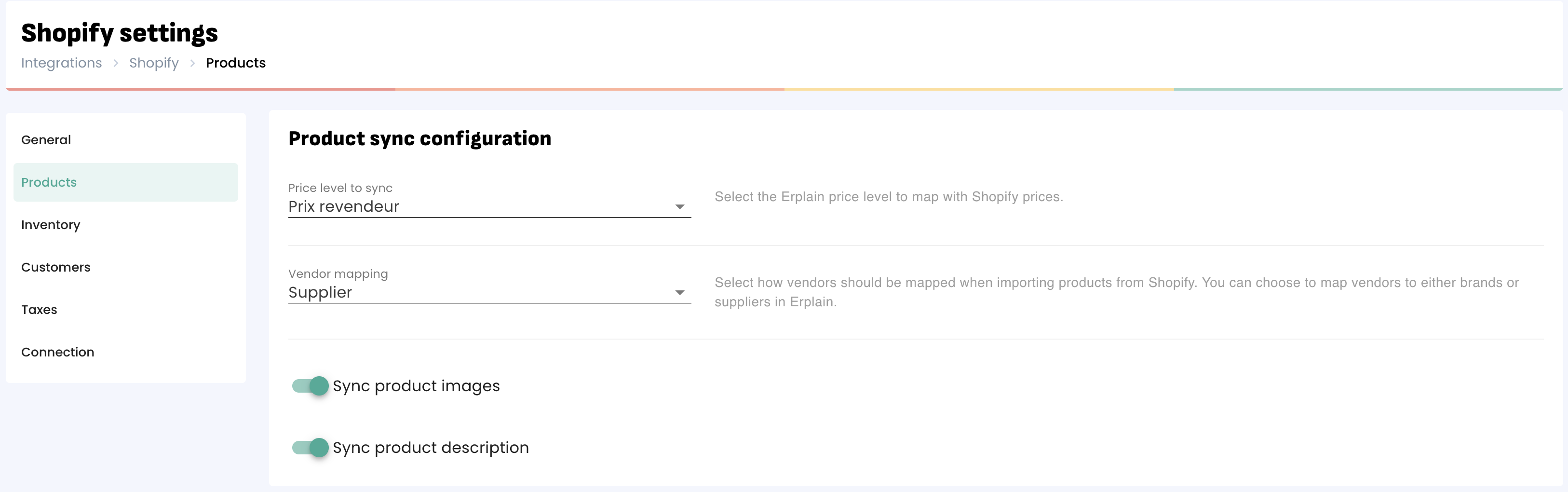
Products
Once your Erplain account is connected to your Shopify account, you can import your products from Shopify or export your products from Erplain to Shopify.
Once your products are in both applications, every change made on Erplain will automatically update Shopify and vice versa. Please note Erplain will synchronize products and variants.
You can do the same with prices.
Click here to see more details and instructions on the Product sync.
Customers
Every time an order is placed in Shopify, Erplain will create this customer in your account. If this customer is already created in Erplain (with the same email address), the customer will not be duplicated.
You also have the option to group all Shopify orders under one customer profile if you don't want every single new Shopify order to create a customer.
Please note that customers are not pushed from Erplain to Shopify. If you create a new customer in Shopify, it will be created in Erplain.
Orders
Orders created from Shopify (or Shopify POS) will be created automatically in Erplain. Erplain will generate a sales order and an invoice within a few seconds or a couple of minutes.
When you fulfill the order in Shopify, Erplain will create a shipping order automatically. If the order is coming from Shopify POS, the sales order, the invoice and the shipping order are created at the same time.
If you cancel or change an order in Shopify, it will sync back to Erplain.
IMPORTANT:
- It is not possible to import your orders history from Shopify to Erplain.
- Please note that Sales orders created in Erplain are not sent to Shopify.
Inventory
Erplain will synchronize your Available inventory in real time with Shopify. When you create a sales order in Erplain, your inventory will be updated in both systems.
When you make stock adjustments with purchase orders, stock entries, stock removal or stock movements, your inventory will also be updated in Erplain and Shopify.
Payments
Payments added from Shopify appear in Erplain. As soon as a payment is made through Shopify, the payment method used is automatically created in Erplain. (also works with your third party payment providers, Stripe, Paypal, ect).
Locations
You can map your stock locations between Erplain and Shopify from the menu Integrations > Configure Shopify > Inventory.
For information, you can sync only one Erplain location per Shopify location and vice versa.
Taxes
Shopify allows you to manage how your store charges taxes. Erplain will never send tax information to Shopify. However, the taxes used in your Shopify orders will be automatically created in Erplain.
For more information on setting up taxes in Shopify, we recommend that you visit this page.
Assemblies
You can create assemblies and bundles in Erplain. They will sync with Shopify like normal products.
You can find additional information on assemblies and bundles on this page.
Multiple Shopify stores
At this time, it is not possible to connect multiple Shopify stores to the same Erplain account.
Was this article helpful?
That’s Great!
Thank you for your feedback
Sorry! We couldn't be helpful
Thank you for your feedback
Feedback sent
We appreciate your effort and will try to fix the article
