Erplain synchronizes customer records (companies and individuals) from HubSpot and allows you to configure your import rules and duplicate detection.
Prerequisites
To be synchronized to Erplain, a HubSpot record must reach the customer lifecycle stage. Erplain takes into account:
- A Company whose lifecycle stage is set to Customer.
- A Company not yet at the Customer stage, but whose Primary Contact is.
- An Individual Contact (with no associated company) at the Customer stage.
Synchronization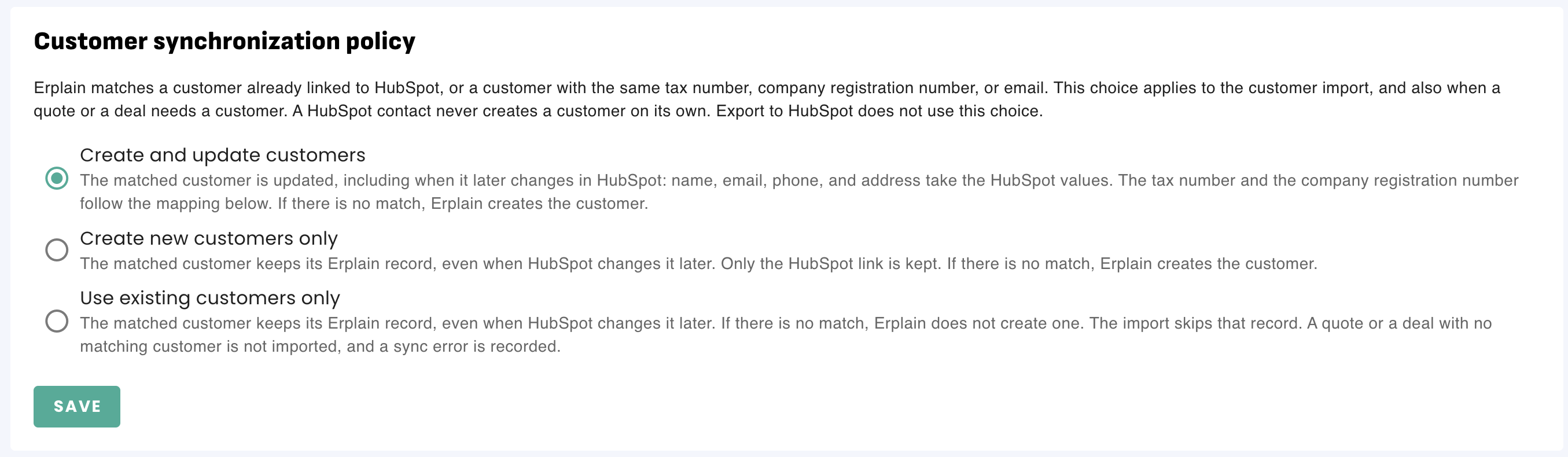
In Integrations > HubSpot > Customers, define Erplain's behavior when a customer is detected. Detection is based on an existing link, VAT number, SIREN/Tax ID, or email:
| Selected policy | If the customer already exists in Erplain | If the customer does not exist in Erplain |
|---|---|---|
| Create and update customers | The Erplain record is updated with the name, address, email, phone number, and tax IDs from HubSpot. | Erplain creates the new customer record. |
| Create new customers only | The Erplain record is not modified. Only the sync link is preserved. | Erplain creates the new customer record. |
| Use existing customers only | The Erplain record remains unchanged. | Erplain does not create the customer. A deal or quote associated with this customer cannot be imported and will generate an error. |
Mapping VAT numbers and SIRET / SIREN / Tax ID
Under the Company fields section:
- Map the HubSpot property corresponding to the VAT number.
- Map the HubSpot property corresponding to the Tax ID.
Note: Hidden properties in HubSpot (such as Tax ID) do not appear in the dropdown list. If needed, create a visible custom property in HubSpot.
Import, export, and manual actions
- Import HubSpot customers: Retrieves all qualified companies and contacts.
- Export customers to HubSpot: Sends your Erplain customers to HubSpot. A company becomes a HubSpot company (with an associated contact if a name/email is provided), and an individual becomes a HubSpot contact.
- On each Erplain customer page: You can click Update from HubSpot to refresh data or Send to HubSpot to force an export.
Note: Demoting the lifecycle stage or deleting the record in HubSpot only removes the sync link: the Erplain customer and all associated sales documents remain intact.
Was this article helpful?
That’s Great!
Thank you for your feedback
Sorry! We couldn't be helpful
Thank you for your feedback
Feedback sent
We appreciate your effort and will try to fix the article